

Welcome to the Leica Essentials Kit!
Get access to everything you need for precision reality capture – from laser scanner guides and technical documentation to training resources, downloads, and expert support from ATG’s specialized team.
Request a Consultation
Hardware Resources
Hardware Solutions
Get the powerful workstations and hardware needed to process point cloud data efficiently and handle demanding reality capture workflows.
Custom Training Programs
Unlock the full capabilities of your Leica scanner with personalized training tailored to your team’s specific workflows and needs.
Reality Capture Services
Not ready to purchase a scanner? Let our team of Reality Capture specialists handle the scanning work for you with professional precision.
Processing and Modeling Services
Our production team can handle your data processing and create usable as-built models from your point cloud captures.
Support Resources
Click download and enter your info to access each resource.
Swapping EID Number Between Computers
Return license from your current computer using CLM Software, then add EID number to your new computer. Simple license transfer in six quick steps!
Update Leica Software and Firmware for RTC360
Keep your RTC360 current: Download latest Cyclone Register 360 Plus software and RTC360 firmware from myWorld. Includes USB firmware update steps.
Cyclone Register 360 Setup - Plus Edition
Complete setup guide including myWorld registration, software download, CLM package installation, EID activation, and Cyclone Cloud account creation.
Cyclone Register 360 Setup - BLK Edition
BLK-specific setup instructions including myWorld access, BLK Edition download, license activation, and Field360 app account setup.
Register 360 Workflow – BLK360
Step-by-step instructions to connect the scanner via USB, import scans, optimize bundles, finalize registration, and publish to RCP Cloud. Includes BLK Data Manager option.
Register 360 Workflow – RTC360
Step-by-step instructions to import from USB drive, pre-registration, bundle optimization, finalization, and cloud publishing. Complete 15-step guide.
How to delete BLK2GO points using Cyclone Register 360
Quick workflow for cleaning BLK2GO point clouds by selecting and deleting unwanted data with shape-based tools and restore options.
How to delete BLK ARC points using Cyclone Register 360
Instructions for removing unwanted BLK ARC scan data by selecting, isolating, and deleting points while preserving key surfaces.
Create Limit Boxes in Cyclone Register 360 with BLK ARC Data
Step-by-step guide to creating, managing, and exporting limit boxes to isolate and deliver specific areas of your point cloud.
Scanner Specifications
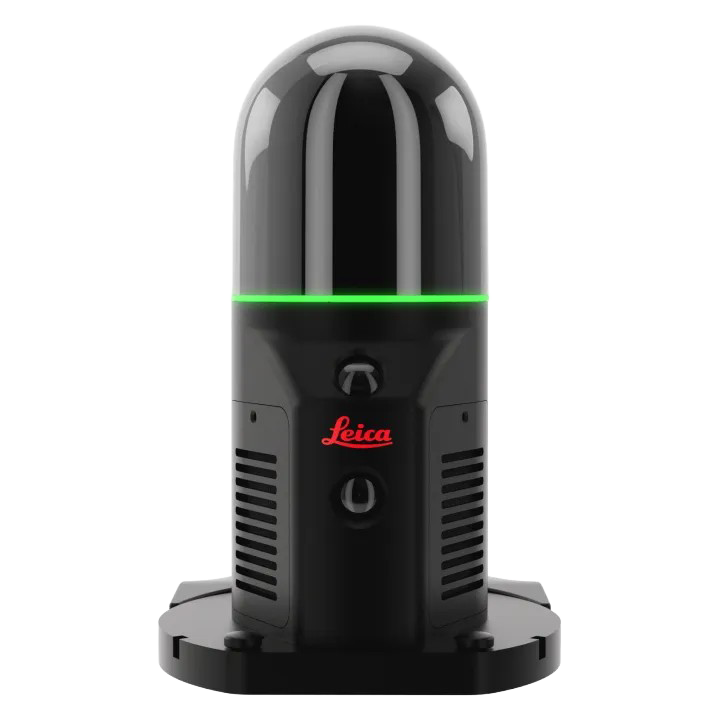
Leica BLK ARC
The BLK ARC is a mobile scanner that can be mounted to a backpack or a robot.
| Environment: | Designed for indoor use |
| Speed: | 420,000 PPS |
| Range: | .5m – 25m |
| Accuracy: | +/- 10mm |
| Weight: | 690 g |
| Size: | 80mm |
| Battery: | Power supply sold separately |
| Storage: | 24 hours of compressed data / 6 hours of uncompressed data |
| Temperature Range: | Operating: 32°F to 104°F |
| Data Transfer: | Data downloaded via Wi-Fi or a USB 3.0. |
BLK ARC Benefits
Intuitive and First-Person Scanning
Visualize scans in real time with live 2D, 3D, and panoramic views and get first-person guidance with smart sensor feedback while scanning.
Lightweight and Truly Mobile
Can be mounted on a Backpack for walk-and-scan use and weighing in at less than two pounds. The BLK ARC can also be mounted on a variety of other platforms such as robots like Spot the Boston Dynamics robot dog or any other kind of robots, tripods on wheels, or any other platform you would want to use.
Easy to Use with Modern Devices
Compatible with iOS and Android devices via the BLK Live app or the Leica Field 360 app with one-button operation and app-based control – just walk and capture!
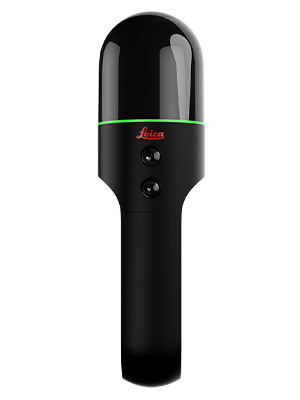
Leica BLK2GO
The BLK2GO is a handheld imaging laser scanner that creates a 3D digital twin while you walk through a space. It is the fastest and easiest way to scan a large building, structure, or environment.
| Environment: | Designed for indoor use |
| Speed: | 420,000 PPS |
| Range: | .5m – 25m |
| Accuracy: | 6mm |
| Weight: | 1.65 lbs |
| Size: | 282mm X 80mm |
| Battery: | 40–45 minutes with exchangeable, rechargeable Li-Ion battery |
| Storage: | 20 hours of uncompressed capture; 40 hours of compressed capture |
| Temperature Range: | Operating: 23°F to 104°F Storage: -13°F to 158° |
| Data Transfer: | Data downloaded via Wi-Fi or a USB-C wired connection. |
BLK2GO Benefits
GrandSLAM Technology
Combines LiDAR SLAM, Visual SLAM, and an IMU to deliver best-in-class handheld mobile mapping performance. Gain speed and confidence when capturing including large indoor, outdoor, underground, complex, and multi-level spaces.
Versatile and Lightweight
Scan as you go with no interruptions. The lightweight aluminum construction allows for excellent dexterity, making it easy to scan over and under objects or through doorways.
Real-Time Visualization
Compatible with the BLK2GO Live app, providing live 2D and 3D visualization while scanning so you can ensure total coverage before leaving the site.
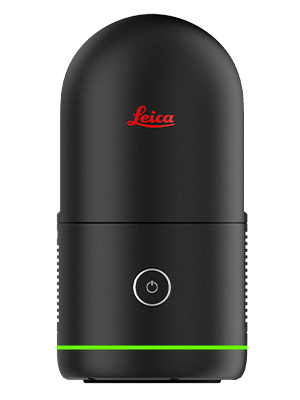
Leica BLK360 Gen 2
The next-generation BLK360 is the smallest and lightest imaging laser scanner available, redesigned to be five times faster than the original G1 while maintaining best-in-class precision.
| Environment: | Designed for indoor and outdoor use |
| Speed: | 680,000 PPS |
| Range: | .5m – 45m |
| Accuracy: | 4mm |
| Weight: | 1.87 lbs |
| Size: | 155mm X 80mm |
| Battery: | Up to 70 setups per battery (exchangeable, rechargeable Li-Ion) |
| Storage: | Internal storage for up to 1,500 setups |
| Temperature Range: |
Operating: 23°F to 104°F
Storage: -40°F to 158°
|
| Data Transfer: | Data downloaded via Wi-Fi or a USB-C wired connection. |
BLK360 Gen 2 Benefits
Ultra-Fast Capture
Complete a full-dome scan with 104 MP 360-degree images in only 20 seconds, allowing you to blaze through job sites without compromising quality.
Visual Inertial System (VIS)
Leica’s patented VIS technology automatically tracks the scanner’s movement between setups to pre-register your scans in the field, saving hours of manual post-processing.
Cloud and Software Integration
Seamlessly integrates with Cyclone FIELD 360 and HxDR cloud platform for easy data sharing, collaboration, and Scan-to-BIM workflows.
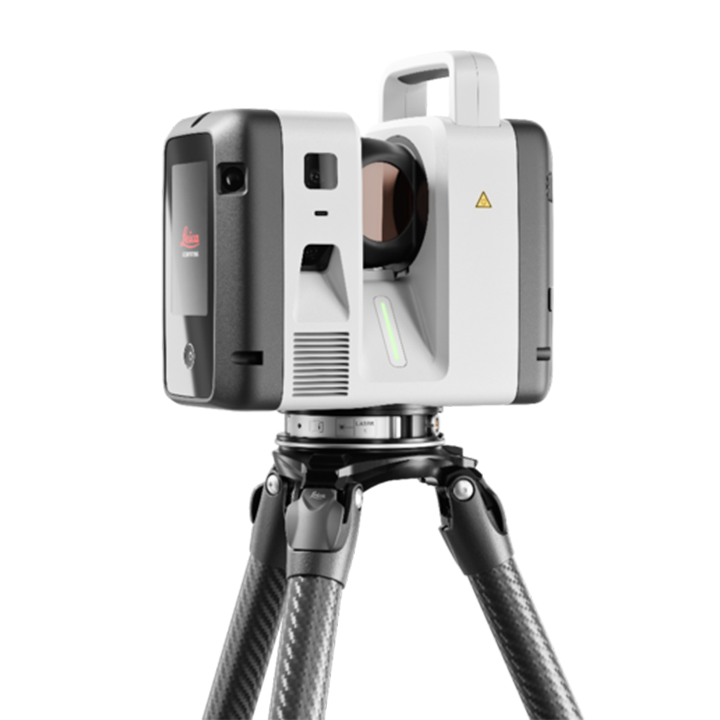
Leica RTC Series
Leica’s new RTC series are professional-grade, high-speed 3D laser scanners designed for large-scale projects, offering unrivaled productivity through its “Fast, Agile, Precise” workflow.
| Environment: | Designed for indoor and outdoor use (IP55 Rated) |
| Speed: | Up to 2,000,000 PPS |
| Range: | .5m – 270m |
| Accuracy: | 1.2mm |
| Weight: | 11.7 lbs |
| Size: | 121 mm x 240 mm x 254 mm |
| Battery: | Typically 4 hours (2x internal, rechargeable Li-Ion batteries) |
| Storage: | 512 GB internal solid-state drive (SSD) |
| Temperature Range: | Operating: 23°F to 104°F Storage: -40°F to 158° |
| Data Transfer: | USB-C (USB 3.2 Gen2) interface to an external storage device |
RTC Series Benefits
Three Levels of Performance
Choose the Leica RTC scanner that fits your project scale, working conditions, and performance requirements.
Field-to-office collaboration
Livelink in Leica Cyclone FIELD 360 eliminates site revisits while work is still unfolding by connecting field and office teams through Hexagon GeoCloud.
Faster Data Visualization
VIS technology automatically registers scans in the field, turning captured reality into full, usable datasets — ready for BIM, CAD, and the visualisation tools you already use.
Product Comparisons
Click and enter your info to access each resource.
Leica FAQ
FAQ guide covering software registration, Field360 app users, battery life, troubleshooting frozen scanners, and more.