Metadata: The Story Behind Every Data Point
A submittal log shows a status of Open, Submitted, and Closed.
What it doesn’t show, at least not on its own, is who reviewed it, when they reviewed it, or whether the version in front of you is the one that got approved in the first place.
Metadata, Broadly Speaking
Every piece of data carries a second layer of information sitting alongside it: who created it, when, what format it’s in, and what version it represents.
A photo on your phone comes with a timestamp and a location, even though the photo itself is just an image. A Word document tracks who last edited it and when, separately from the actual content on the page. That second layer is metadata, not the content itself, but everything describing where it came from, who’s responsible for it, and whether it’s still current.
A more useful way to think about it, at least in construction software, is this: metadata is every field the platform knows how to store about a record. Not the handful anyone happens to be looking at today. All of them. If Procore or Autodesk has a field for it, that field is metadata, and the system can read it, filter with it, sort by it, and trigger off it.
None of this is unique to construction. It’s how most digital systems work, in any industry, but construction leans on that layer more than most realize. So much of the daily AEC work moves through multiple platforms and documents, passing information between people who never see each other in person and have no other way to confirm that what they’re looking at is accurate.
This second layer is also the one that tends to get lost first when data moves between systems, which is the specific problem ATG Connect was built to solve.
What Metadata Looks Like in Construction Software
Take an RFI response. The data is the answer itself: the question asked got resolved this way. The metadata is everything around it, who asked the question, who submitted the response, what date it went in, whether it was the original answer or a revision after a follow-up question. Strip that layer away, and you’re left with an answer and no way to confirm it’s current or who stands behind it.
But that’s just the surface. The full record carries a lot more: the ball-in-court assignment, the spec section it references, the drawing and sheet number it points back to, the cost impact and schedule impact flags, the due date, the days open, the distribution list, the responsible contractor, the location or level it applies to, and whatever custom fields the team stood up at the start of the job. Every one of those is a field. Every one of those is something a system can act on if it’s there and something nobody can act on if it isn’t.
A submittal works the same way. The data is the document: the spec sheet, the product cutsheet. The metadata is the version number, the reviewer, the approval date, and the chain of revisions that got it there, plus the submittal package it belongs to, the spec section, the lead time, the required-on-site date, the review cycle it’s currently in, and the stamp that came back with it. Two submittals can hold identical content and mean two different things depending on which one carries the current stamp.
An issue on an issues log runs into the same gap. A status of “open” doesn’t say much by itself, at least not until you know who logged it, when, and whether it’s been touched in the last three weeks or just sitting there because nobody remembered to close it out. Add the trade responsible, the location on the model, the linked photos, the priority, and the root cause code, and the same status starts to mean something specific.
SOME of the Fields is NOT the Same as ALL of the Fields.
This is where most integrations fall short. They don’t drop metadata entirely. They map a subset of it, usually the ten or fifteen fields somebody decided mattered at the time the integration got built. Number, title, status, assignee, date. The essentials.
Everything else gets left behind, and it gets left behind silently. There’s no error, no warning, no flag on the report. The record shows up on the other side looking complete because the obvious fields are all populated. It’s the fields nobody thought to check that are empty, and those tend to be the ones that matter later rather than now.
A PDF export is the extreme version of the same problem, which is worth walking through because it makes the failure visible.
What Gets Lost When Data Becomes a PDF
A PDF is convenient for a reason. It looks the same everywhere, it’s easy to send, and nobody needs special software to open it. But a PDF is a picture of the data, not the data itself. Once a submittal or an RFI response gets exported into one, the submitted-by field, the version number, and the approval date are all still visible on the page, but they exist as printed text now, not as structured fields a system can read, filter, or sync.
Compare that to viewing the same information as actual fields inside a platform like Autodesk Forma, where each piece of metadata is its own attribute attached to the model or the document, not flattened text sitting on a page.
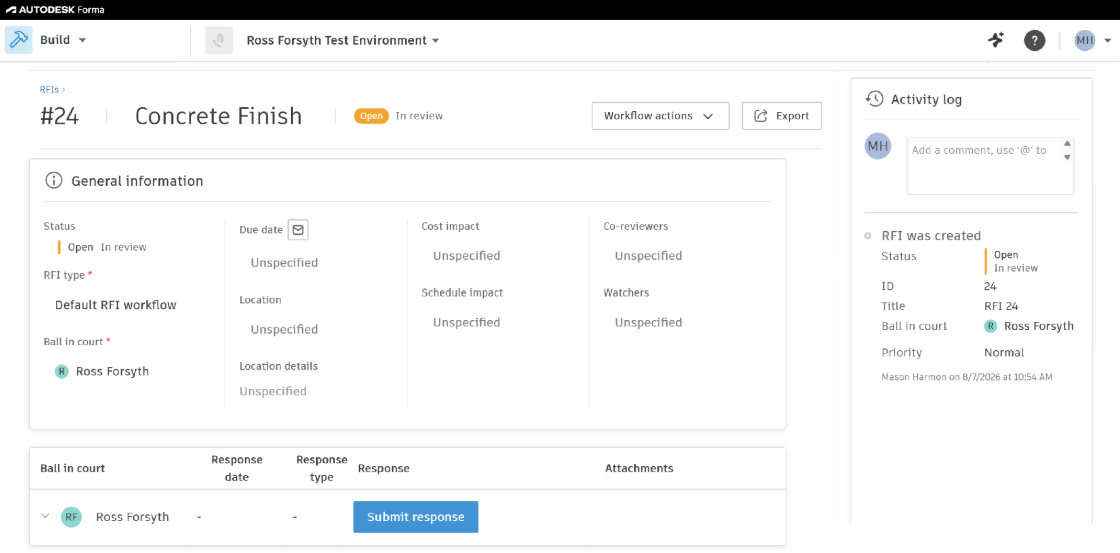
In the screenshot above, the creator, due date, status, and activity are each their own field. That means a connected system can pull the reviewer’s name specifically, sort by status, or flag any changes to the RFI automatically. A PDF of the same document can’t offer any of that. The information is present, but it’s inert. Nothing downstream can act on it without someone retyping it back into a system that can.
The partial-mapping integration lands somewhere in the middle. Some of the record stays live and queryable. The rest is gone, and unlike the PDF, there’s no page you can go read it off of.
Why ATG Connect Uses Every Field, Not Just the File
Plenty of integrations move data between systems and consider the job finished once the file itself has landed on the other side. The document transfers. The status transfers. But the metadata attached to it, who touched it last, when, in what version, often doesn’t survive the handoff.
ATG Connect syncs the underlying fields directly, not a flattened copy of them, and it syncs all of them rather than a curated shortlist.
When a submittal moves from Procore into Forma, the version history and reviewer information travel with it as structured data, not as text baked into a document. When an RFI response syncs between platforms, the who and the when move along with the what, along with the spec references, the cost and schedule flags, the custom fields, and the rest of the record. Nobody has to reconstruct any of it from memory on the other side.
The Fields You Don't Need Yet
The argument for syncing everything isn’t really about today’s report. It’s about the fact that Procore and Forma are both still shipping features, and neither one is going to call ahead and ask which fields you decided to carry over.
When a platform releases a new dashboard, a new filter, a new automation rule, or a new analytics view, it builds it on fields that already exist in the record. If those fields came across, the new capability works on day one and works retroactively, across the full history of the job. If they didn’t, the feature is technically available and practically empty, and the fix is a backfill: re-running syncs, re-mapping fields, and hoping the source data is still intact on projects that closed out eighteen months ago.
Carrying every field forward means the integration doesn’t have to be rebuilt every time a platform adds something.
The data is already sitting there waiting for a use nobody had thought of when the connection got set up.
That matters most in the moments when someone above the project level pulls a report and needs to trust it without making a call first. A number that arrives with its context intact doesn’t invite the follow-up question about where it came from, because the proof is already sitting right next to it instead of waiting to be tracked down after the fact.